

برنامج fvkhl^FastStone Capture v7.6 + KeyGen


البرنامج : FastStone Capture
إصــــدار : V7.6

وظيفة البرنامج : إلتقاط الصور
حجـم البرنامج : 2.42 MB
ترخيص : غير مجاني
{الكيجن مرفق مع الملف}

نبذة عن البرنامج :
برنامج يعرض الصور وبه ايضا امكانية التعديل أو التفاط صورة الشاشة FastStone Capture برنامج قوى ومرن فى الاستخدام وشاشة منطقية FastStone Capture يتيح لك التقاط أي شيء على الشاشةبما فيها النوافذ، والأشياء والشاشة الكاملة، مناطق المستطيل والمناطق المختارة للرسم التمرير و النوافذ صفحات الويب.FastStone Capture يحتوى على ميزات مبتكرة مثل لوحة تعويم اللقطة, مفاتيح الاختصار،النص التوضيحي ، تغيير الحجم ، والطباعة ، والتقطيع، والبريد الإلكتروني.
FastStone Capture is a powerful, lightweight, yet full-featured screen capture tool that allows you to easily capture and annotate anything on the screen including windows, objects, menus, full screen, rectangular/freehand regions and even scrolling windows/web pages. You can choose to send captures to editor, file, clipboard, printer, email, Word/PowerPoint document or upload them to your website.
Editing tools include annotating (texts, arrowed lines, highlights), resizing, cropping, sharpening, watermarking, applying edge effects and many more. It also allows you to record screen activities and sound into highly compressed video files. Other features include global hotkeys, automatic filename generation, support for external editors, a color picker, a screen magnifier and a screen ruler. FastStone Capture saves files in BMP, GIF, JPEG, PCX, PNG, TGA, TIFF and PDF formats
خصائص البرنامج :
لوحة للالتقاط الصور صغيرة وفى متناول الايدى ومفيدة
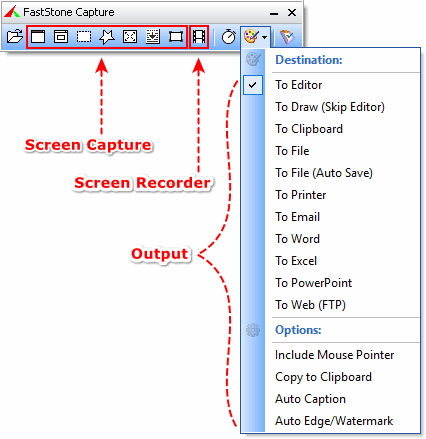
توفر الوصول السريع إلى أدوات الالتقاط وخيارات الإخراج
مفاتيح الاختصار العالمي لتفعيل التقاط الشاشة فورا
التقاط أي شيء على الشاشة بما فيها النوافذ، والأشياءوالشاشة الكاملة، مناطق المستطيل والمناطق المختارة للرسم اليدوىوالتمرير و النوافذ صفحات الويب.
امكانية التقاط الصورة للعديد من النوافذ والاشياء وايضا القوائم ذات المستويات المتعددة
يحتوع على العديد من الخيارات التى تحدد طبيعة المخرجات (التعديل الداخلي، ذاكرة النصوص، الملف، الطابعة...)
اضافة رسوم توضيحية لبعض الاشياء باستخدام (النصوص , خطوط على شكل اسهم للتوضيح , العناوين الرئيسية, اضافة العلامة المائية , المستطيلات ,الدوائر)
تطبيق بعض المؤثرات مثل اسدال الظل على الصورة (drop-shadow) , الاطار , تمزيق الحافة أو جعلها باهتة اللون
امكانية اضافة تعليق على الصور
تغيير الحجم ، والتقطيع، التدوير ، وجعل الصورة اكثر وضوحا وحدة ، ودرجة السطوع، وتعديل الألوان..
التراجع والاعادة Undo/Redo
يدعم التعديل الخارجى
يمكن الحفظ فى ملفات على الصيغ الاتيه BMP, GIF, JPEG, PCX, PNG, TGA, TIFF , PDF
إرسال الصور التي تم التقاطها عن طريق البريد الإلكتروني
ارسال الصور التي التقطتها إلى مستندات Word,PowerPoint
إرسال الصور الملتقطة إلى الخادم (بروتوكول نقل الملفات FTP) على الويب
تسجيل نشاطات وصوت الشاشة على ملف فيديو
مجمع للالوان الشاشة المركبة
مكبر للشاشة
مسطرة للشاشة
دعم العديد من الشاشات
التشغيل بمجرد بدء الويندوز(اختيارى)
خفضه الى منطقة علبة النظام (Minimize to System Tray area)
اثاره صغيرة فى الذاكرة
• A small handy Capture Panel that provides quick access to its capture tools and output options• Global hotkeys to activate screen capturing instantly• Capture windows, objects, menus, full screen, rectangular/freehand regions and scrolling windows/web pages• Capture multiple windows and objects including multi-level menus• Options to specify output destination (internal editor, clipboard, file, printer ...)• Draw annotation objects such as texts, arrowed lines, highlights, watermarks, rectangles and circles• Apply effects such as drop-shadow, frame, torn-edge and fade-edge• Add image caption• Resize, crop, rotate, sharpen, brighten, adjust colors ...• Undo/Redo• Support external editors• Save in BMP, GIF, JPEG, PCX, PNG, TGA, TIFF and PDF formats• Send captured images by email• Send captured images to Word and PowerPoint documents• Send captured images to a Web (FTP) server• Record screen activities and sound into video files• Screen Color Picker• Screen Magnifier• Screen Ruler• Support multiple monitors• Run when Windows starts (optional)• Minimize to System Tray area• Small footprint in memory• And many more...
موقع البرنامج :
توافق البرنامج :


واجهة البرنامج :

تحميل البرنامج:

البرنامج مع الكيجن :
رابط مباشر للملف التنفيذي للبرنامج
أو
رابط مباشر للملف مضغوط :
رابط مباشر للنسخة المحمولة
الكيجن منفرد من أحد الروابط التالية :
البرنامج + نسخة محمولة + التفعيل :
FastStone Capture 7.6 + Portable
شروحات للبرنامج في ملفات PDF :
أو :

